
Your AI-Powered ErgoSuite!
FIRST, FOR CONTEXT, LET'S REVIEW ES Pro Workstation Assessments
ErgoSuite Enterprise enables organizations to seamlessly measure and manage employee behaviors, workstations, psychosocial stress, identify ergonomic risk factors, and prevent musculoskeletal disorders (MSDs) across distributed workforces at clients across the globe.
It includes personal Behavioral Management Tools which are also specifically designed to prevent unnecessary healthcare overutilization, risk factors for chronic conditions including heart disease, diabetes obesity, and certain cancers highly, correlated to prolonged static postures and Digital Fatigue which is widely recognized in cybersecurity as the biggest attack surface vulnerability today.
The solution platform, designed over decades in partnership with clients, automatically and intelligently guides employees through training, workstation assessments, personalized behavioral coaching and allows ESH teams to effortlessly manage ergonomics programs across distributed workforces.
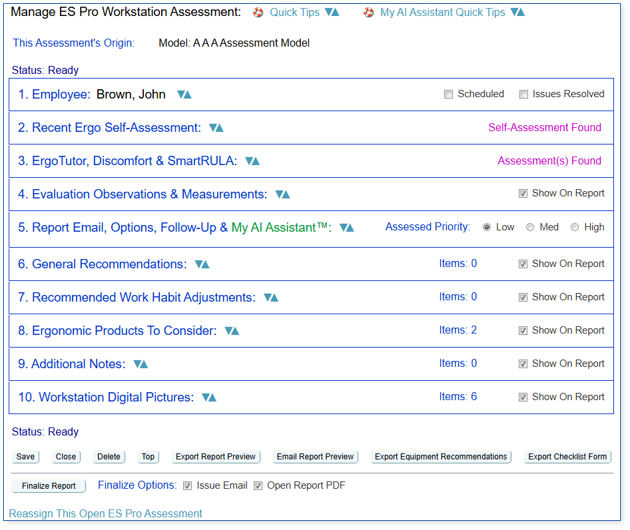
Among ErgoSuite’s many tools for Safety Teams is ES Pro Workstation Assessments for safety professionals:
- ES Pro organizes and groups various assessment-related information into chapters just like any book.
- You only work in the chapters (also called sections) which are of interest to you. You can easily customize ES Pro Workstation Assessments yourself renaming, removing and reordering sections as you wish.
- The toolset offers streamlining and consistent organization of the pre-built or your own assessment checklist items as well as convenient places to manage your observations and recommendations for mitigating potential risk.
- The end result is a professional high-quality Final Report which is emailed to the employee and perhaps their manager.
- Completed ES Pro assessment data is available for use with a wide array of analytical tools and reports within ErgoSuite.
- ES Pro: Intuitive Assessment Tools For Professionals – Based on models/templates controlled by clients.
- These powerful SaaS tools have been designed for portable devices (e.g. iPad, Surface, Android, Notebooks, etc…) for EHS to use when conducting any type of workstation assessments.
- ES Pro simplifies and streamlines the professional workstation assessment process, centralizing the resulting consistently structured information within ErgoSuite for reporting, analysis and follow-up.
- Unlimited customizable assessment models enable you to load your own workflows and checklists and professional assessment processes or use the pre-built default assessments delivered with the platform.
- Add pictures and any other documents to assessments.
- Optionally add approved equipment, furniture, other products and vendors in ErgoSuite (simple) for EHS staff to easily select during the assessment process and final report.
- ES Pro is used primarily for Office and Laboratory Assessments although it can be used for any type of ergonomic assessment.
- Produces high-end professional reports which are easily understandable by employees.
- Designed for clients with internal safety teams and also for clients who outsource safety assessments to outside Ergonomic Professional Services Providers.
- ES Pro remembers your observations and recommendations so you can select often reused text in future assessments, saving you from having to recreate and retype them.
My AI Assistant is available to authorized safety team members in Section 5:
Introducing My AI Assistant™ Feature Pack 1
Leveraging state-of-the-art Advanced AI and Computer Vision, My AI Assistant is a game-changer for Office and Laboratory Ergonomics Assessment Tools and the beginning of an exciting new era of ErgoSuite features, designed in partnership with clients, to:
- Provide fresh novel capabilities never available before and
- Assist professionals in reducing the time it takes to complete professional assessments of employees at their office and remote computer workstations so they can spend more one-on-one time with the employee.
The first new AI-powered capabilities in My AI Assistant Feature Pack 1, described below, are available in the latest release with many more AI Feature Packs to come! ErgoSuite AI Feature Packs will be released periodically enabling clients to selectively license and use the AI features which are most important to them.
Within ES Pro, you’ll find My AI Assistant’s powerful Advanced AI and Computer Vision Feature Pack 1:
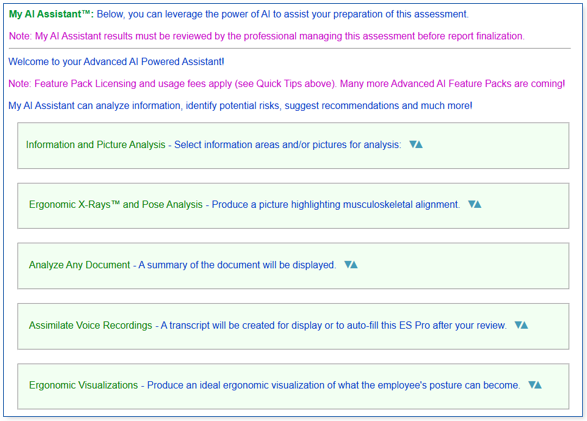
1. Information and Picture Analysis
Select any ErgoSuite information areas and/or pictures for rigorous analysis. Following Advanced AI and Computer Vision analysis, observations and recommendations will be displayed. You can review the analysis and simply choose any observations and recommendations to include in your assessment report, exactly where you want them. Of course, you can edit the observations and recommendations to perfectly fit your writing voice and style.
Due to the highly flexible source information selection process, you can have My AI Assistant analyze any relevant area(s) of information for the employee in ErgoSuite and/or any picture or group of pictures.
For example, with one click, you can have My AI Assistant analyze observations you’ve noted in an ES Pro, the employee’s latest ErgoTutor Training results, their latest Ergo Self-Assessment results, their latest SmartRULA Assessment results, their latest Desktop General Assessment results, their latest Discomfort Note and up to 10 pictures – all within seconds.
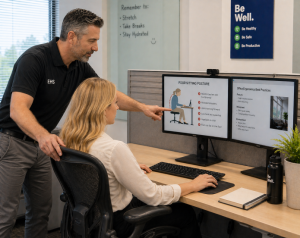
For clients using ES Pro on their iPad, iPad Pro, Surface, Android or other tablet, you can visit an employee, take some pictures using the device and have My AI Assistant analyze the photos for risks in seconds.
My AI Assistant’s analysis of the information produces this on-screen interactive report:
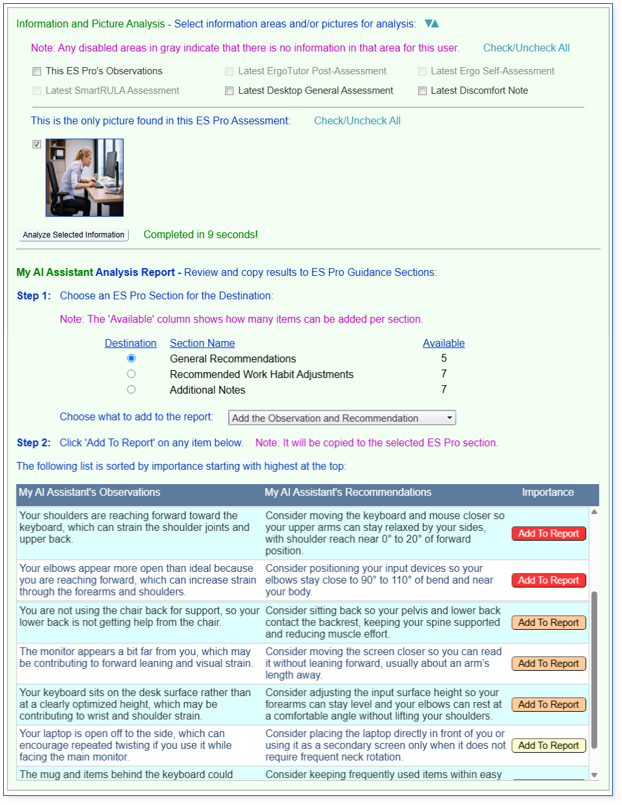
The observations and recommendations are written in a voice speaking to the employee who you’re helping with the ES Pro Workstation Assessment.
Once added to the report, you can further adjust the observations and recommendations however you wish to further personalize them for the employee who will read the report
2. Ergonomic X-Rays™ and Pose Analysis
Two types of pictures can be produced in this tool from your pictures of employees: Ergonomic X-Rays and Pose Analysis pictures.
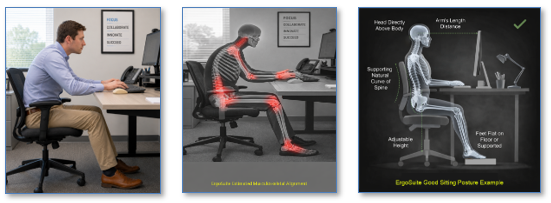
The Ergonomic X-Ray is a novel intuitive approach to conveying, viewing and understanding ergonomic musculoskeletal positioning (posture).
All general employees already understand the concept of x-ray images from everyday life. For example, if you injure your arm, you go to the hospital expecting to see an x-ray picture to see what’s happening with your bones (fracture, hairline break, no breaks, etc…).
There are many uses of x-rays in society today including Chest X-Rays, Bone X-Rays, Dental X-Rays, Industrial X-Rays, Security X-Rays, Baggage X-Rays and more. The word preceding “X-Rays” is used to define their application hence, in this application, where the x-ray is virtual for ergonomic analysis, we’ve coined the term Ergonomic X-Ray to easily convey the picture’s application.
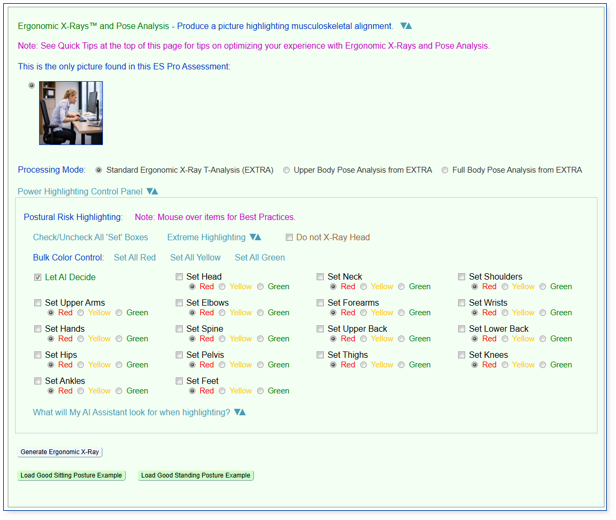
Pose Analysis provides an additional analytical and creative function where you can let My AI Assistant determine the placement and risk coloring of the overlaid pose lines in the resulting picture – or you can control it yourself. Pose lines will be added to the original picture to depict ergonomic risk.
The pose lines will be calculated by the Ergonomic X-Ray T-Analysis (EXTRA) engine and placed on the original picture without an X-Ray motif being rendered. Alternatively, you can open the Power Highlighting panel and choose which of the lines to show and choose specific colors for each line to achieve your objective.
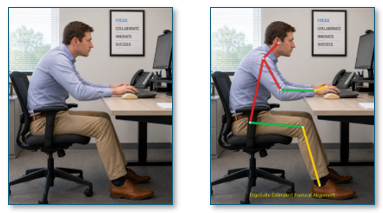
Select any pictures in your ES Pro Assessment to produce an Ergonomic X-Ray or Pose Analysis version of the exact picture revealing the musculoskeletal alignment of the employee in the picture with high-risk joints and areas highlighted.
With one click, you can add the Ergonomic X-Ray or Pose Analysis as a new picture in your ES Pro assessment report to help employees understand their posture, easily see any musculoskeletal alignment issues and what your recommendations are designed to correct.
In addition to transforming workstation pictures into Ergonomic X-Rays, you can include built-in example Ergonomic X-Rays which convey proper neutral postures – or create your own.
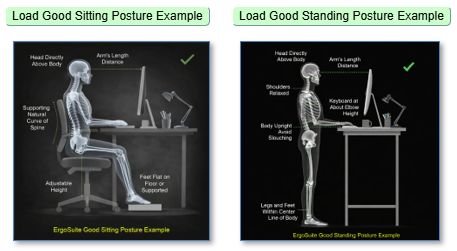
Are you old-school and not sure about AI still? We didn’t leave you out as My AI Assistant has something perfect for you! Open the Power Highlighting panel to take control and decide for yourself where risk highlighting should be indicated.
If that isn’t enough, open the Extreme Highlighting panel to fine craft your own special risk highlighting colors to indicate varying levels of risk.
Have a great idea for a new proper neutral posture example picture with captions and more but not sure where to begin? ErgoSuite has you covered! Let us know and we’ll roll up our sleeves together and we’ll build the picture for you, no fee, as part of the service.
3. Analyze Any Document
Ergonomists often review a variety of employee-related, job-related, and workplace documentation to fully understand an employee’s physical demands, limitations, and risk factors since the goal is to match the worker to the job safely and identify improvements.
A lot of time is often needed to review Return-to-Work or Accommodation Plans, Work Restrictions, Workers’ Compensation and Claim Reports, Functional Capacity Evaluations and many other documents.
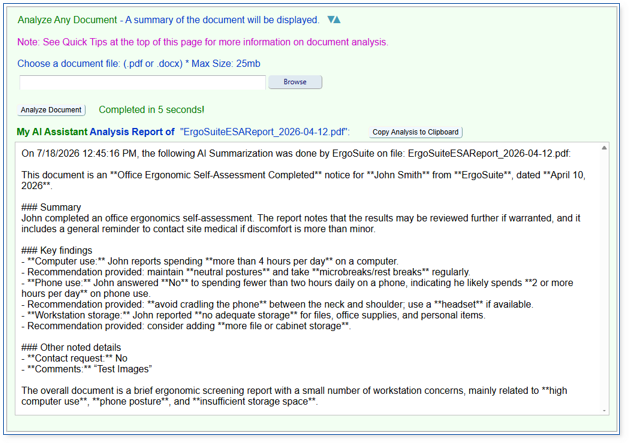
My AI Assistant makes quick work of this to expertly summarize any document for quick understanding and clarity.
Select any employee-related documents from your computer and My AI Assistant will rigorously analyze them for you and return a concise summary analysis for you to review and save enormous amounts of your time.
4. Talk To ErgoSuite!
Ergonomists typically visit onsite employees in person and need to allocate much time to making notes of observations and potential solutions. At some time later, they have to integrate those notes into their assessment tool which can be time consuming.
Matching state-of-the-art mainstream Healthcare System practices today, where doctors no longer need to write or type notes while assessing patients, My AI Assistant transforms modern ergonomic assessment workflows by automatically transcribing and integrating spoken notes, made during in-person evaluations, directly into assessments, making “talking to ErgoSuite” an intuitive and huge time-saving reality – today.
Beyond the sheer convenience, talking is typically 3 to 4 times faster than typing for the average person. While the average adult types at roughly 40 words per minute (WPM), they speak at a natural rate of 130 to 150 WPM. Even “fast” typists hitting 70–80 WPM are still significantly slower than their natural conversational speed.
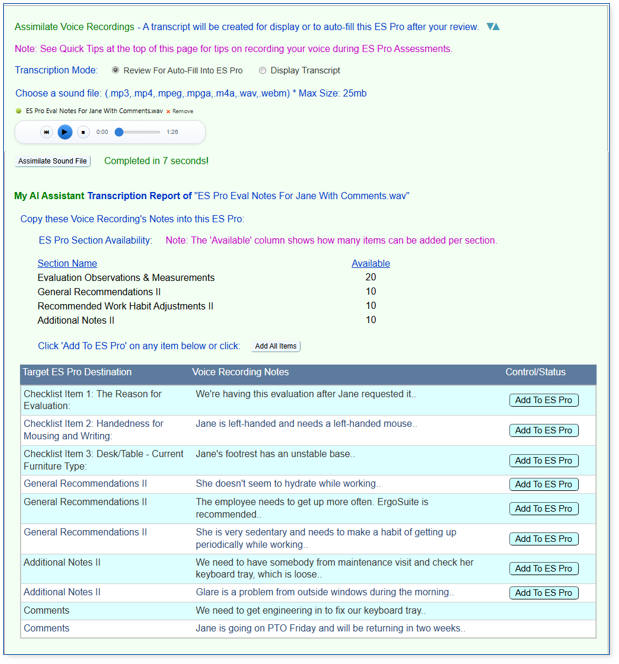
Now, you can assimilate (meaning to take in and process) any voice recordings you’ve made of employee-related observations or notes on your notebook, tablet, iPhone or Android phone. My AI Assistant will analyze it for you and return a concise transcription or even auto-fill your ES Pro after your review, in seconds.
The resulting on-page report is shown below. You can click a single button to add all of your spoken observations and recommendations to the report draft in one click or you can individually select any items for placement into your report.
Of course, you can adjust them however you wish once they’re in your ES Pro report draft.
The following is just a brief example of how it works, while you can have any length assessment meeting transcribed by My AI Assistant.
Separately from assessment meeting voice assimilation, described above, you can now “directly talk to ES Pro” in general and save even more time completing each assessment.
Simply speak your amended notes, observations and recommendations to ES Pro – and watch ES Pro autofill what you’ve shared!
To speak in real-time with ES Pro, click or tap the microphone icon near any text entry boxes on the page.
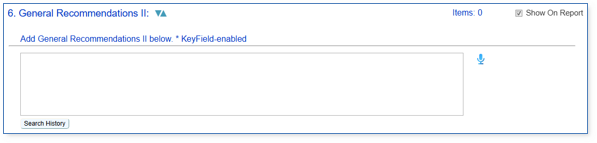
5. Ergonomic Visualizations
Last, but definitely not least in this current release, here’s an additional powerful method of conveying to the employee what you’re aiming for – to help them be most comfortable, reduce risk of discomfort, reduce their fatigue rate and boost their productivity.
Select any employee picture in your ES Pro assessment and design how it should transform to represent what ergonomic best practices would look like for that employee at their workstation compared to the original picture.
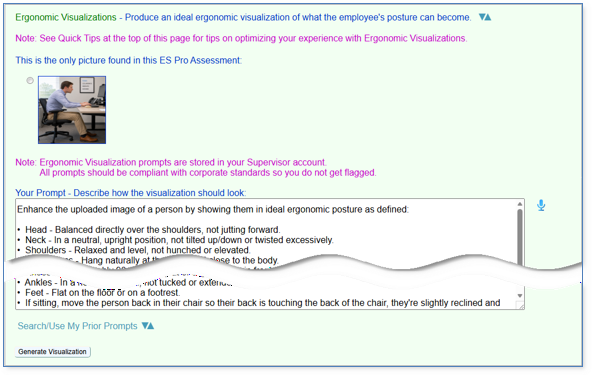
The result will be the exact same employee in the exact same location – now demonstrating ergonomic postural best practices.
You’ll design your own result through telling My AI Assistant what should be done with the picture.
Beyond changing the person’s posture, you can easily change any of their equipment, furniture, anything! You can be very precise and, for example, have My AI Assistant replace the chair (or any workstation component) with a very specific manufacturer’s chair model and color with whatever options you like! Use product names or actual product numbers for any furniture or equipment being changed!
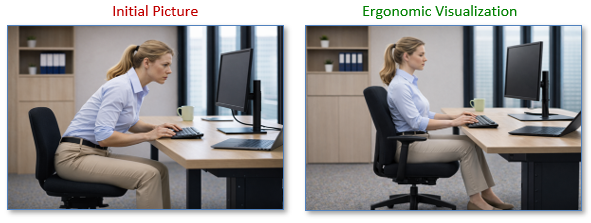
Wait! You may have noticed that there is still some room for improvement in the above Ergonomic Visualization because there is a potential for contact stress for the wrists. That’s simple to improve where we’ll simply adjust our prompt to mitigate that risk also.
You are the producer. My AI Assistant is your Advanced AI tool.
However you instruct My AI Assistant’s Ergonomic Visualizations is called your Prompt. You can use the default prompts provided, adjust them however you wish or completely create your own. These are automatically saved with every new Ergonomic Visualization you produce so you can reuse great prior prompts from previous Ergonomic Visualizations to reapply to new employee pictures and ES Pro assessments.
You can designate any prompts to be favorites to be quickly found in the future for new Ergonomic Visualizations.
Tech Talk
For ErgoSuite’s AI power source, we’ve partnered with Microsoft Azure AI Services in order to provide state-of-the-art enterprise features in Advanced AI and Computer Vision technology, security, compliance with all global data privacy regulatory requirements and more.
Client model environments are never comingled with other clients’ model environments. My AI Assistant does not retain data and does not use your data to train AI models. Data is protected in transit using strong encryption TLS 1.2+.
My AI Assistant uses regional model deployments to comply with data privacy and domiciling regulations around the globe. Azure meets all security standards.
For OnPrem ErgoSuite clients, another option is that you can bypass us completely and set up your own model access directly on Microsoft Azure to be used to power My AI Assistant.
Do you have your own internal AI system? Let us know and we’ll scope and quote the project of adjusting ErgoSuite to use your very own internal system to power My AI Assistant.
Best Wishes!
We hope you’ve enjoyed the tour!
There’s one reason why Fortune-100 and other employers have been steady clients over 5, 10, 15 and even 20+ years: It’s because ErgoSuite and our Service Level as a partner exceed their expectations year after year.
We invite you to partner with us as we devote our passion to your success. We would love to work with you as we build out AI-Powered ErgoSuite over the coming years in an effort to exceed your expectations too.
Let us know what you would like to see in the next release of AI-Powered ErgoSuite! Satisfaction is 100% guaranteed.